NFS 文件共享服务 固定端口号 作者:七棵菜 日期:2022-11-30 栏目:计算机分类:90 人气:338 使用文件共享服务,比较简单的方法是使用nfs,但是防火墙配置比较麻烦,因为nfs每次启动是,某些服务启动使用的端口号是不固定的 - 查看nfs使用端口信息 ``` rpcinfo -p ``` 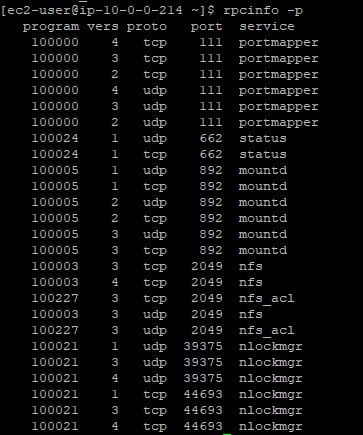 - 固定端口 以下端口通过nfs配置文件文件都是可以设置固定值的 ``` mountd_port=892 statd_port=662 statd_outgoing_port=45341 rquotad=875 nfs=2049 portmapper=111 ``` 编辑配置文件位置 ``` vim /etc/sysconfig/nfs ``` - 变动端口`nlockmgr`进程使用的端口每次都会变化 某些版本的locked端口配置不在上面的配置文件中,可能在如下位置 ``` vim /etc/modprobe.d/lockd.conf ``` 如果修改了如上位置的配置,让然不生效,可以尝试如下方法: ``` vim /etc/sysctl.conf /etc/sysctl.conf ``` 增加如下两行: ``` fs.nfs.nlm_tcpport=30002 fs.nfs.nlm_udpport=30002 ``` 这是因为某些版本nfs加载配置的脚本有些问题,所以更新配置文件并不生效,此时直接更新系统配置文件,不过建议先把系统配置备份一下 ``` cp /etc/sysctl.conf /etc/sysctl.conf.$(date +%F) ``` - 重新加载配置 依次运行如下配置重新加载nfs配置 ``` sysctl -p systemctl restart rpcbind systemctl restart nfs-server systemctl restart nfs-lock systemctl restart nfs-idmap ``` 查看端口是否固定 ``` rpcinfo -p ``` #### 防火墙配置 - 安装iptables ``` yum -y install iptables iptables-services ``` - 添加规则 ``` iptables -A INPUT -p tcp -m tcp --dport 111 -j ACCEPT iptables -A INPUT -p udp -m udp --dport 111 -j ACCEPT iptables -A INPUT -p tcp -m tcp --dport 2049 -j ACCEPT iptables -A INPUT -p udp -m udp --dport 2049 -j ACCEPT iptables -A INPUT -p tcp -m tcp --dport 892 -j ACCEPT iptables -A INPUT -p udp -m udp --dport 892 -j ACCEPT iptables -A INPUT -p tcp -m tcp --dport 662 -j ACCEPT iptables -A INPUT -p udp -m udp --dport 662 -j ACCEPT iptables -A INPUT -p tcp -m tcp --dport 39375 -j ACCEPT iptables -A INPUT -p udp -m udp --dport 39375 -j ACCEPT iptables -A INPUT -p tcp -m tcp --dport 44693 -j ACCEPT iptables -A INPUT -p udp -m udp --dport 44693 -j ACCEPT ``` - 保存规则 ``` sudo service iptables save ``` - 重启防火墙 ``` sudo service iptables restart ``` ### 鸣谢 - [赏金Micheal](https://www.jianshu.com/p/9fb004b30f1e) 标签: nfs 端口 防火墙 上一篇:如何使用mvn命令导入依赖 下一篇:angular8 表单集成ueditor富文本编辑器 随便看看 2022-11-30 配置apache, nginx 支持 angular2+ 等单网页项目路由刷新 2023-08-16 nginx配置angular项目部署在项目子目录 2022-11-30 设置 .gitignore 不忽略文件夹的规则 2022-11-30 git查看某文件最近的修改内容 2022-11-30 实现 git 切换分支后代码互不影响 留言
